NaviSense Is a New AI Smartphone Tool That Helps Visually Impaired Users Locate and Reach Objects in Real Time
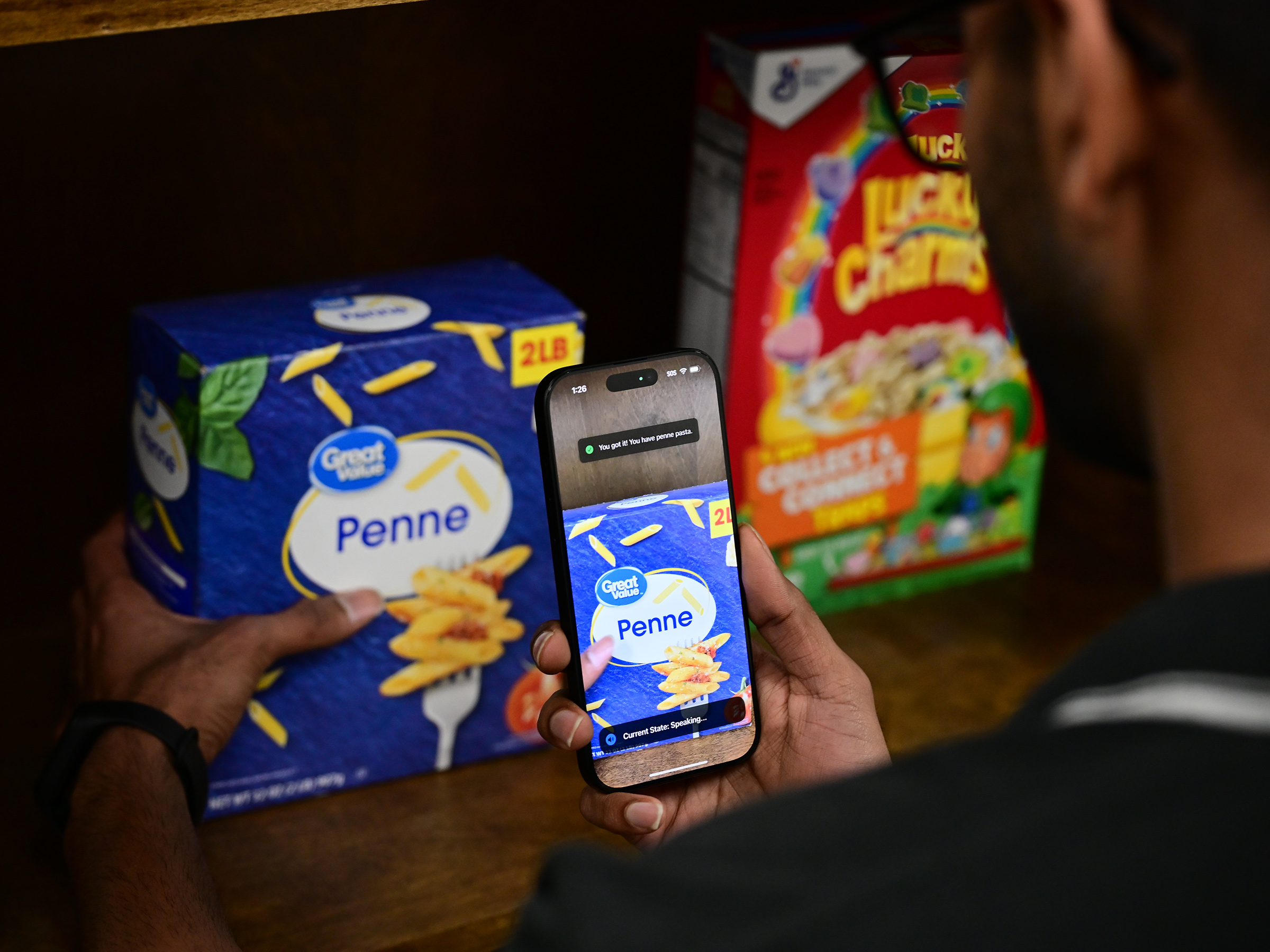
Researchers at Penn State University have developed a new AI-powered smartphone application called NaviSense, designed to help people who are visually impaired locate objects around them and physically reach those objects with greater ease. While assistive technologies for visual impairment have advanced rapidly in recent years, many existing tools still fall short in flexibility, privacy, and real-time accuracy. NaviSense aims to directly address those gaps by combining artificial intelligence, computer vision, and user-centered design into a single mobile solution.
At its core, NaviSense is built to support everyday tasks—finding a cup on a table, reaching for keys, or locating a specific object in an unfamiliar environment—without relying on preloaded object databases or constant human assistance. Instead, it uses spoken prompts, real-time camera input, and multimodal feedback to guide users dynamically and intuitively.
What Makes NaviSense Different From Existing Assistive Tools
Many current visual-aid applications rely on either human support services or limited automated recognition systems. Human-assisted services can raise privacy concerns and are often inefficient for simple, routine tasks. On the other hand, automated tools typically depend on pretrained object libraries, meaning they can only recognize objects that were manually added to their system in advance.
NaviSense moves away from both of these constraints. The app uses large language models (LLMs) and vision-language models (VLMs) hosted on external servers. This allows the system to recognize objects on demand, based on what the user asks for, without requiring predefined object categories. As a result, users are not restricted to a fixed set of recognizable items and can interact with their environment far more naturally.
How the NaviSense App Works in Practice
NaviSense operates as a smartphone application, using the phone’s built-in camera, microphone, speakers, and vibration motors. A user begins by speaking a request, such as asking the app to find a specific object. The app then scans the environment in real time through the camera feed.
If the request is vague or unclear, NaviSense can ask clarifying follow-up questions to narrow down the search. This conversational ability makes the system more flexible than traditional object-recognition tools, which usually fail silently when they cannot interpret a command.
Once the target object is identified, NaviSense guides the user toward it using a combination of audio cues and haptic feedback. The app communicates directional information such as whether the object is to the left or right, above or below, and how close the user’s hand is to the target. When the user’s hand aligns correctly with the object, the system provides a clear confirmation signal.
Real-Time Hand Guidance as a Key Innovation
One of the most important features of NaviSense is its real-time hand guidance. By tracking the movement of the smartphone, the app can infer how the user’s hand is moving in space and adjust its guidance accordingly. This allows NaviSense to actively help users reach for objects rather than simply describing where those objects are located.
According to feedback gathered during development, this feature was one of the most requested by people who are visually impaired. Existing solutions often stop at object identification, leaving users to guess how to physically reach the item. NaviSense fills that gap by offering continuous, responsive guidance until the object is successfully located and reached.
Community-Driven Design and User Interviews
Before building the application, the research team conducted extensive interviews with members of the visually impaired community. These conversations helped the developers better understand real-world challenges that are often overlooked in assistive technology design.
Insights from these interviews shaped several core features of NaviSense, including conversational interaction, hand guidance, and the emphasis on flexibility rather than rigid object databases. This user-informed approach ensured that the final system addressed actual needs rather than assumed ones.
Testing, Evaluation, and Measured Improvements
After development, NaviSense was tested by 12 visually impaired participants in a controlled environment. The researchers compared NaviSense against two commercial assistive tools, measuring how long it took users to locate objects and how accurately each system performed.
The results showed that NaviSense significantly reduced the time users spent searching for objects. It also demonstrated higher accuracy in identifying and guiding users to targets compared to the commercial alternatives. Beyond quantitative metrics, participants reported a noticeably better overall experience, especially appreciating the clear directional cues and precise hand guidance.
Recognition at an International Accessibility Conference
The NaviSense project was presented at the ACM SIGACCESS ASSETS ’25 Conference, officially known as the 27th International ACM SIGACCESS Conference on Computers and Accessibility. The conference took place from October 26 to October 29 in Denver and is one of the most prominent global venues for accessibility-focused research.
At the event, NaviSense received the Best Audience Choice Poster Award, highlighting strong interest and positive reception from researchers, accessibility experts, and practitioners in the field.
Technical Foundations Behind NaviSense
From a technical standpoint, NaviSense represents a broader shift in assistive technology toward open-world AI systems. By leveraging LLMs and VLMs, the app can interpret both language and visual information together, enabling it to understand what users are asking for and what the camera is seeing at the same time.
The system’s reliance on external AI servers allows it to handle complex computations without overloading the smartphone itself. However, this design choice also introduces challenges related to power consumption and efficiency—areas the research team is actively working to improve.
Current Limitations and Path Toward Commercial Use
While NaviSense is already functional and user-friendly, the developers acknowledge that further refinements are needed before a full commercial release. One major focus is optimizing power usage, as continuous camera processing and AI communication can drain a smartphone battery quickly.
The team is also working on improving the efficiency of the AI models, aiming to reduce latency while maintaining accuracy. These improvements would make the app more practical for extended daily use.
Despite these challenges, the researchers note that the technology is close to being market-ready, especially compared to earlier prototypes.
Why Tools Like NaviSense Matter
Globally, millions of people live with visual impairment, and even small improvements in assistive technology can have a profound impact on independence and quality of life. Tools like NaviSense represent a move toward context-aware, adaptive, and user-driven systems that respond intelligently to real-world conditions.
By eliminating the need for preloaded object models and introducing active hand guidance, NaviSense demonstrates how modern AI can be applied in ways that are not only technically impressive but also genuinely practical.
Broader Context: AI and Accessibility
NaviSense is part of a growing wave of AI-driven accessibility tools that aim to reduce barriers in everyday life. Similar technologies are being explored for navigation, text recognition, scene description, and social interaction. What sets NaviSense apart is its focus on object retrieval, a task that may seem simple but is often one of the most frustrating challenges for people who are visually impaired.
As AI models continue to improve, applications like NaviSense are likely to become more efficient, affordable, and widely available, further expanding their potential impact.
Research Paper Reference:
https://doi.org/10.1145/3663547.3759726